
Home · Workbench · From the first meeting to the invoice
From the first meeting to the invoice
Quote, project, time tracking on request, invoice and the export to your tax advisor in one program. Once something is entered, nobody types it in a second time.
For freelancers and small consultancies, contacts are often in one program, quotes in a text template, hours in a spreadsheet, invoices in a fourth tool and receipts in a shoebox.
At the end of the month, you gather everything and retype it. In this CRM, a customer management system with quotes, invoices and bookkeeping, everything is in one place, from the first conversation to the export to your tax advisor.
I use it for polisMEDIA. Quotes and invoices come out on my own letterhead and meet the German standard for business letters (DIN 5008) and the mandatory details for invoices under the German VAT Act.
- Booking
- Quote
- Hours
- Invoice
- Tax advisor
Anyone who books an appointment appears in the CRM as a suggested new customer, without retyping. new customer
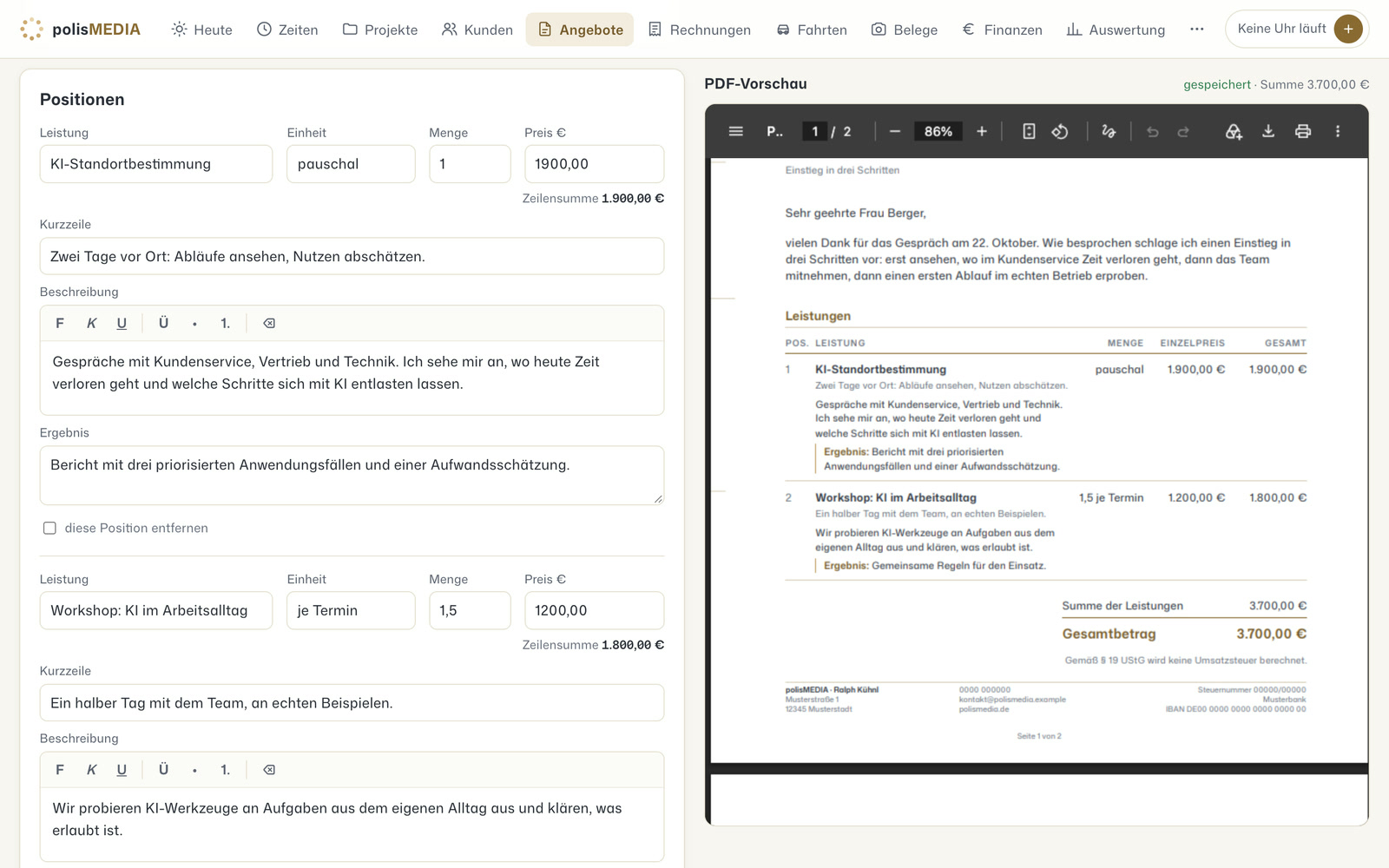
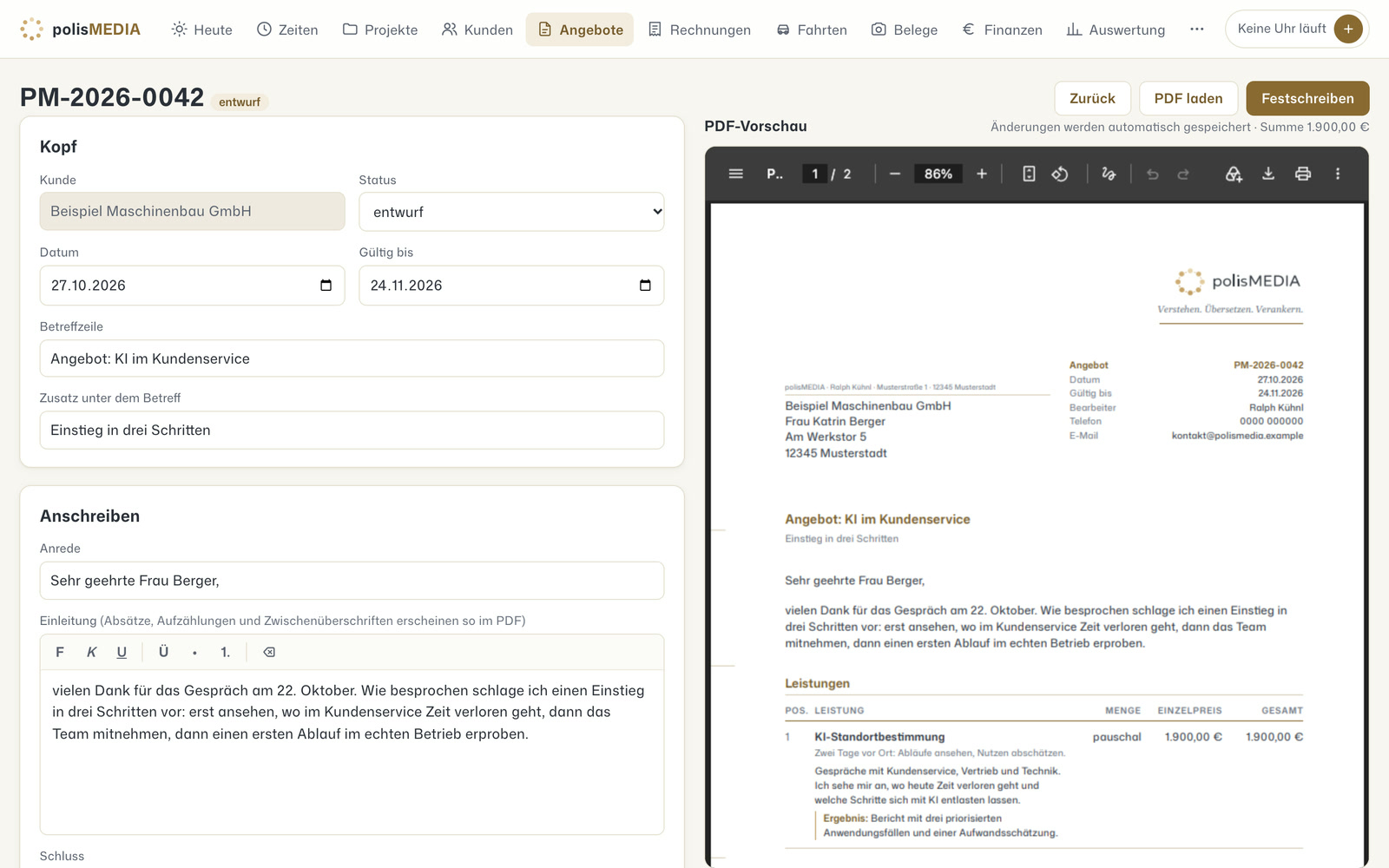
You put the quote together from the service catalog and see the preview. When it is done, you freeze it. After that, it can no longer be changed, only replaced by a new version. quote A-2026-031
You log your working time with one sentence in the messenger, typed or spoken. “2 hours concept”
The project becomes the invoice with proof of work. You see open items at a glance. invoice R-2026-112
You photograph receipts with your phone, and your tax advisor gets an export. October export
- Logs working time from an informal sentence
- Suggests which company a receipt belongs to
- Writes the text for the proof of work
One program for your whole workflow instead of four programs between which someone retypes data.
Sales & customers
In use
Screens from the real software
The screens show the German interface. Names and content in them are examples. Click an image to enlarge it.
One job, from the booked appointment to the invoice
An example: a prospect books an initial meeting on the website. That puts his details into the CRM, and nobody has to retype them. After the meeting, you put together the quote from the service catalog and already see the finished PDF while doing it. When you finalize the quote so that it can no longer be changed, the system creates an email draft. It is only sent once you approve it. The customer accepts, and the quote becomes a project with a budget. While working, you log time with one sentence in the messenger: “Two hours of workshop preparation for the Müller project.” After every appointment in the calendar, the system asks whether the time was billable. At the end of the month, the project turns into the invoice, including proof of work.
Customers, quotes, hours, invoices and receipts in one program
Customers without retyping
When someone books an appointment, the CRM suggests them as a new customer, with their details.
Quotes with a preview
Line items come from the service catalog, or you write them freely. You see the PDF while you type. When you finalize a quote, the system calculates a checksum, a long string of characters, from the file. If anyone later changes even one character, the result is different.
Sent only after approval
The system creates email drafts. Only what you have approved goes out.
Time tracking on request
You log time with the stopwatch, with a typed or spoken sentence in the messenger or as an answer to the follow-up question after an appointment. Budget and job costing show whether a flat fee paid off.
Invoices from the quote
The invoice is created from the quote or the project, with proof of work. If you cancel an invoice, a separate cancellation invoice is created, and the old one stays unchanged in the archive. The program matches incoming payments in the bank account to the invoice when the invoice number and amount match. Everything else, it suggests to you for matching.
Receipts and trips
Receipts come in as a photo from the phone, as a scan or as an email attachment, and the program detects duplicates. It reads e-invoices directly from the file. The mileage log suggests trips from the appointments in the calendar, and for purchases in the inventory, the program calculates the depreciation.
Export to your tax advisor
Journal entries are created automatically from invoices, receipts and payments. They are prepared for handover to the tax advisor, along with the BWA, the German monthly business report.
Consultancies, trades, practices and clubs map their own workflow
A CRM of your own pays off where standard programs can do a lot, just not your own workflow. Consultancies and agencies bill projects against hour budgets. In the trades, measurements, quote, materials and travel time belong to one job. Practices and therapists bring sessions and billing together. Clubs collect membership fees, donations and receipts in one place.
Bookings become inquiries, receipts come in by voice
Bookings from the booking system become inquiries, and appointments become suggestions for time tracking. Wilma, the assistant app on the phone, takes receipts and hours by voice. Also possible: taking contacts from lead research into the CRM as customers at the push of a button, attaching minutes from Treffpunkt as proof of work and having customers countersign quotes in the PDF app.
A tool like this, built for your workflow.
Talk about your workflows